The platform
Everything you need to start, run and grow a coaching business.
Families on one side, coaches and academies on the other — and everything between them, running in one place.
The Cultiv8 platform as one map. The demand side — parents, students, learners, schools, academies and resident welfare associations — and the supply side — coaches, academies, schools and studios — meet across five stages: Discover, Match and transact, Deliver and operate, Engage and retain, and Outcomes. An analytics rail guides every stage and the AI copilots act at every stage — each rail entry is labeled with the stage it serves. Every interaction lands in one data platform, and everything stands on a foundation of trust, compliance and safety.
Demand side · consumers
- Parents
- Students
- Learners
- Schools
- Academies
- RWAs
Supply side · providers
- Coaches
- Academies
- Schools
- Studios
5 stages of every coaching relationship
- DiscoverPublic storefronts for every coach & org, feeds, content, search & intake
- Match & transactAI matching, trials, booking, payments
- Deliver & operateSessions, programs, progress, provider ops
- Engage & retainCommunity, follows, tournaments
- OutcomesShowcases, verified progress, placements, jobs
dashboards
every interaction becomes data
memory
A public page families read and book from.
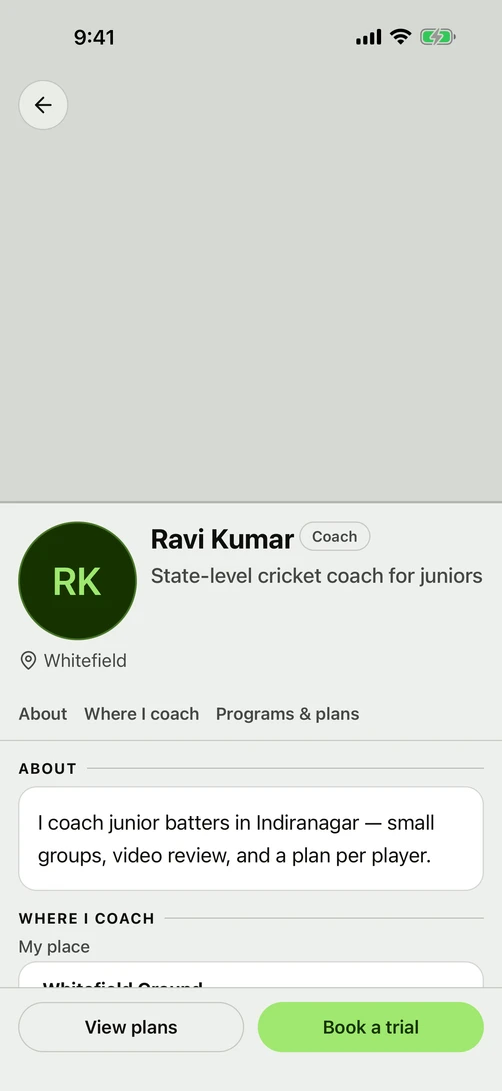
Fill in your profile once and it becomes the page a family reads before they book — what you teach, where, on what days, and what they can book today.

Sign up and build your profile
LiveSign up with a code sent to your phone, then add your photo, your experience, what you teach, and the areas you teach in.
Your public page
LiveYour profile becomes the page a family reads in the Cultiv8 app before they book. It shows what you teach, where, on what days, and what they can book today.
Set up an academy or a school
LiveAnswer three questions to register the academy, then run its venues, its awards and its public page from the same account.
Pick what you teach from a list
LiveChoose your sport or subject from a ready-made list instead of typing it into a box.
Coach marketplace
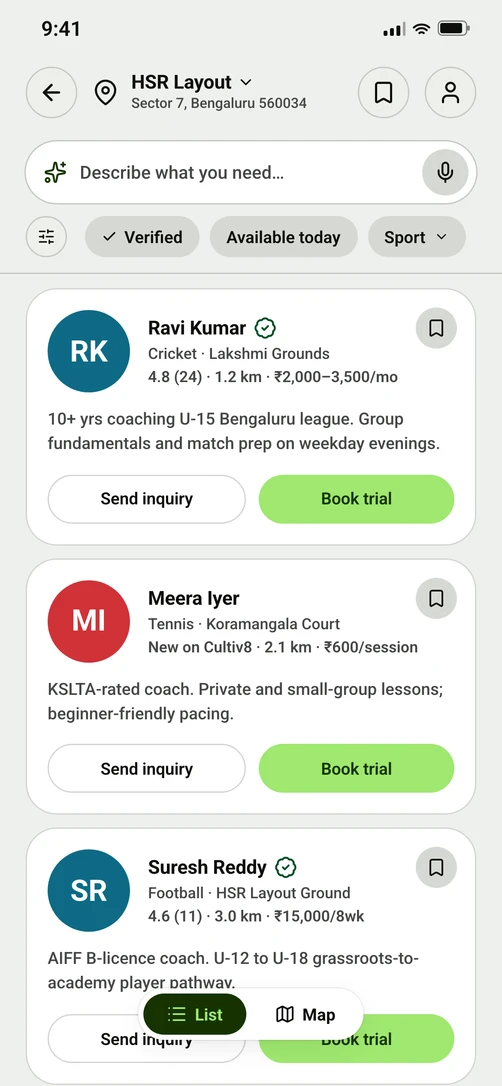
PlannedA parent searches by sport and area, and sees coaches whose area, timings and free seats actually match.
Ask for what you need
PlannedWhen nothing matches, the parent posts what they are looking for, and coaches outside their usual area can answer it.
A demo to try, a plan to buy, and fees that land in your own account.
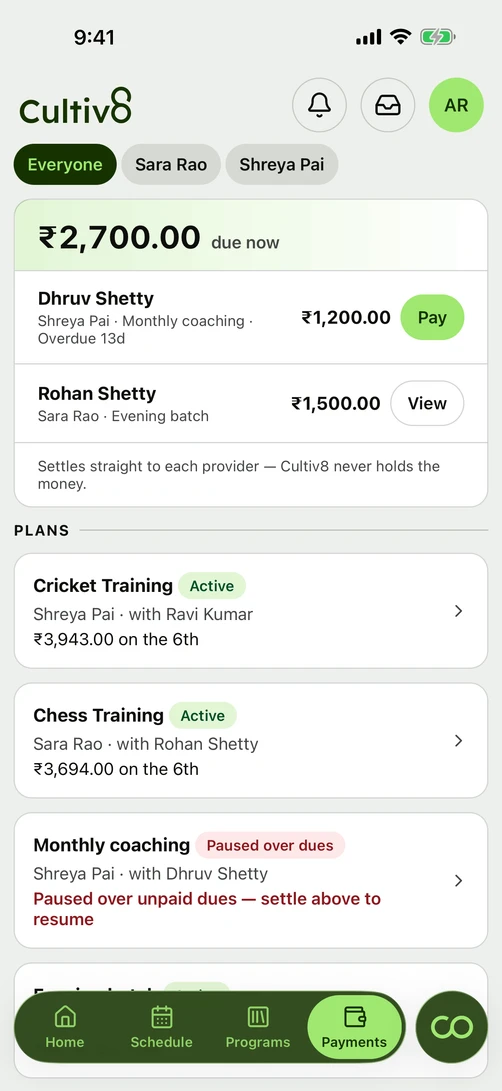
A family tries a demo, picks a plan, and pays by UPI, card or netbanking, with a receipt on every payment — a GST tax invoice when you are GST registered, a bill of supply when you are not. The money lands in your own bank account: Cultiv8 never holds it, and never takes a cut of what you earn from coaching.
Collect fees
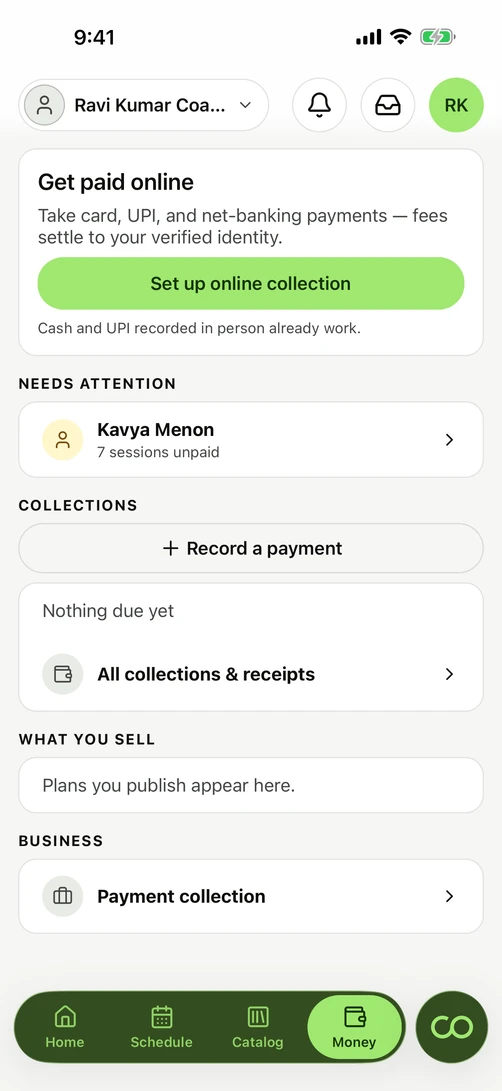
LiveFamilies pay by UPI, card or netbanking, and every payment produces a receipt — a GST tax invoice when you are GST registered, a bill of supply when you are not.
Who owes what, and reminders
LiveEvery family balance on one screen, worst first, with a ready-written reminder you send from your own WhatsApp in one tap. The one message Cultiv8 sends on its own is the payment alert when a bill goes out. Fourteen of the sixteen coaches we spoke to in Bengaluru in January 2026 called collecting fees their single biggest frustration.
Cash and bank transfers
LiveRecord what you collected in cash or by transfer against the same student and the same batch, so your books stay complete even when the money did not come through Cultiv8.
Plans, memberships and trials
LiveSell a monthly plan, a membership or a paid demo. Price it once, and it covers the batches you choose.
Session packs
PlannedA set number of sessions, valid for a period, counted down as they happen.
Credits you top up
PlannedA balance a family tops up once and spends across your programs.
Getting set up to be paid
LiveDo the payment setup once: your tax details and a bank account. After that it works everywhere you teach.
Academy shares
PlannedAn academy collects once, and each coach gets their share automatically, on one statement every side can read.
Sell more than classes
PlannedSell drill plans and session templates, or rent out a ground or a set of equipment, through the payment setup your fees already run on.
The schedule, the register and the record of every class, in one place.
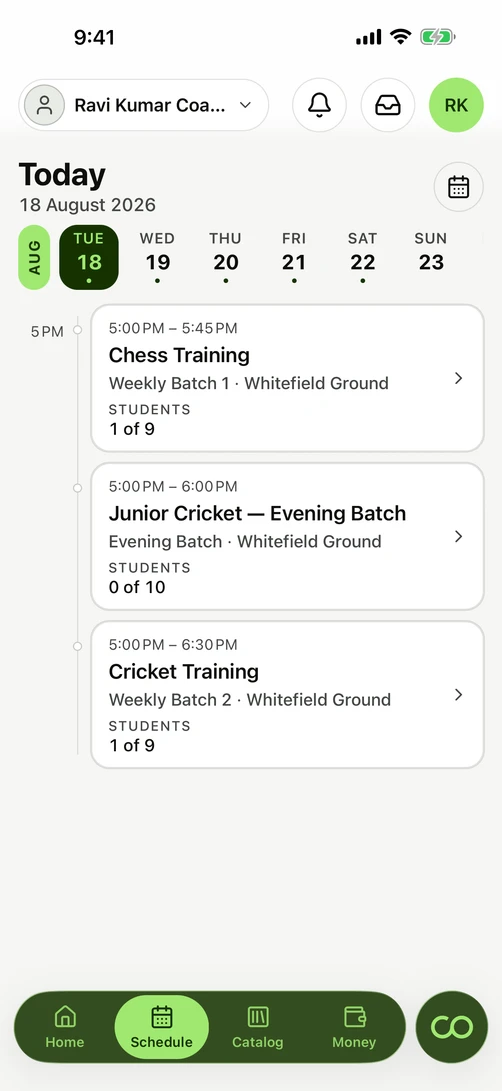
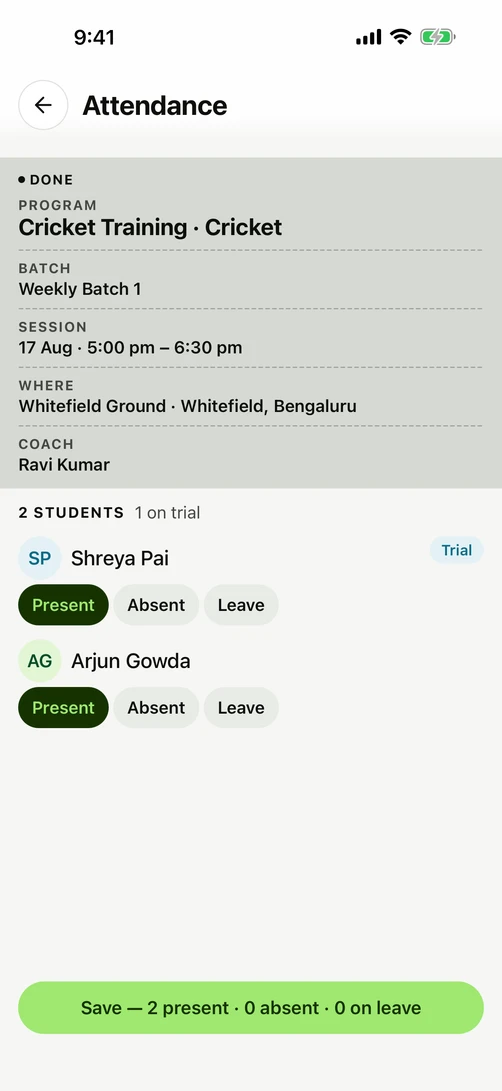
One calendar covers every place you teach, and marking who turned up takes a tap per student. Change a class with a reason attached, and every family hears about it without anyone writing a message.
One calendar for every venue
LiveSet up classes that repeat, across every place you teach, and see every venue's classes on one calendar. Thirteen of the sixteen coaches we spoke to in Bengaluru in January 2026 teach at two or more places.
Programs, batches and slots
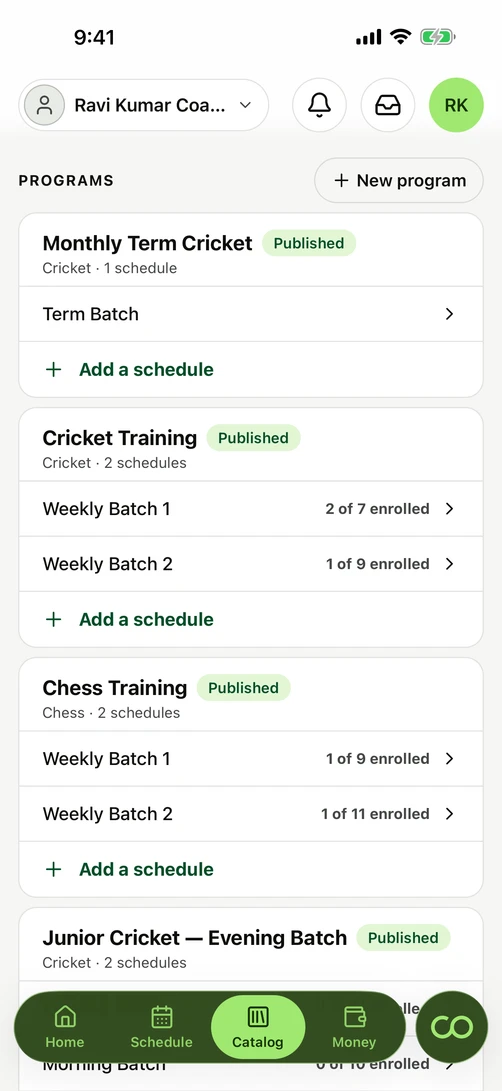
LiveSet up what you teach once, then run as many batches under it as your week has room for. A batch with a single seat is called a Slot on the screen that shows one booked class; the pages a family browses before buying say batch.
Attendance
LiveOne tap per student marks a whole batch in seconds, and the marks hold when the signal does not. Twelve of the sixteen coaches we spoke to in Bengaluru in January 2026 still mark attendance on paper.
Cancel, move and pause
LiveCancel a class with a reason attached and every family hears about it. Moving a class is an edit to the batch it belongs to. Pause a plan, and what it covers and what it bills pause with it.
Reminders that send themselves
LiveA reminder an hour before class, and a payment alert when a bill goes out.
One login, two hats
LiveRun an academy and your own private classes from a single login, with separate books for each.
CoverMe, for a class you cannot take
PlannedWhen you cannot run a class, Cultiv8 offers it to qualified coaches nearby, so your student keeps the session instead of losing it.
Session notes, spoken not typed
PlannedTalk for ninety seconds after a class and get notes for each student, instead of filling in a form you would skip.
Progress reports for parents
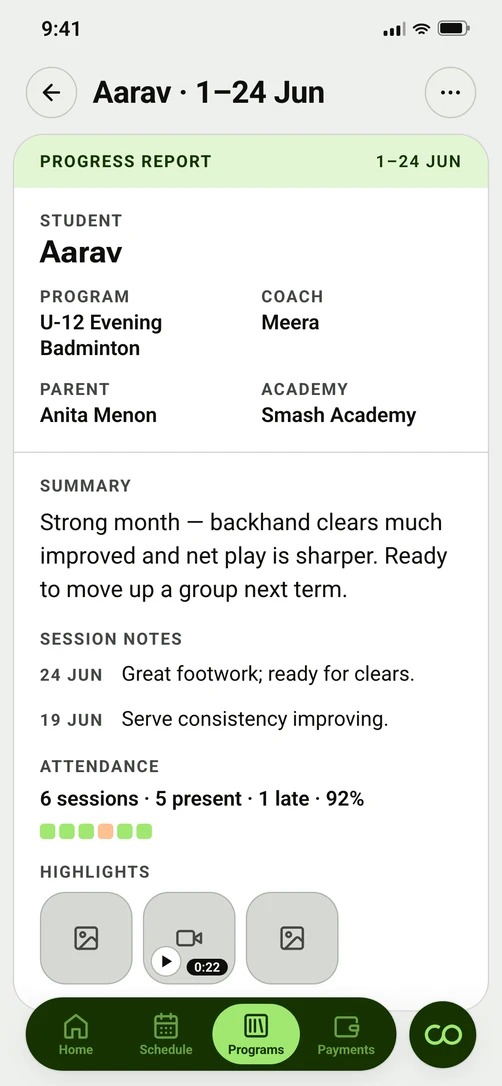
PlannedThe parent reads a weekly summary written for them, rather than the shorthand a coach writes for themselves.
What gets taught, level by level
PlannedEvery sport and subject carries a teaching guide: what is covered at each level, and what a student has to show to clear it.
Groups, community and tournaments that keep families close.
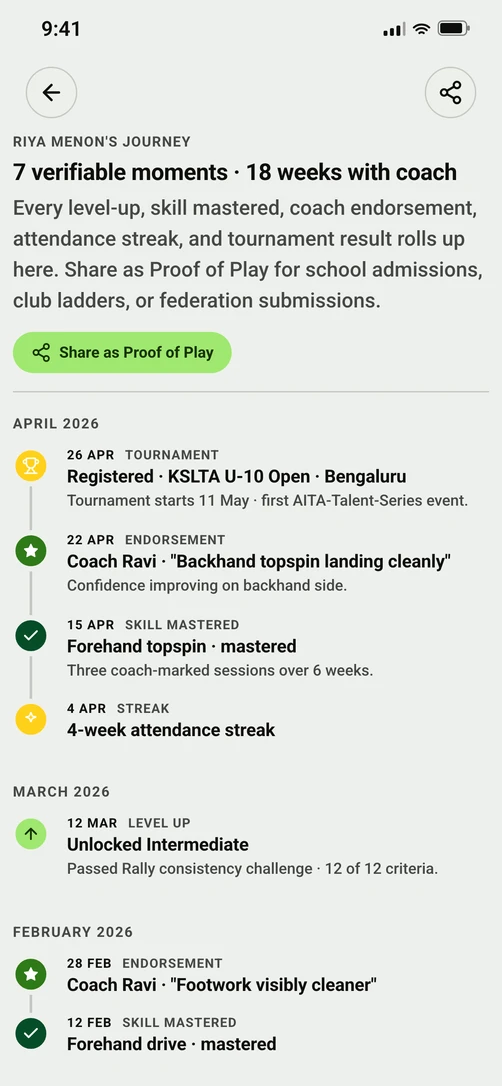
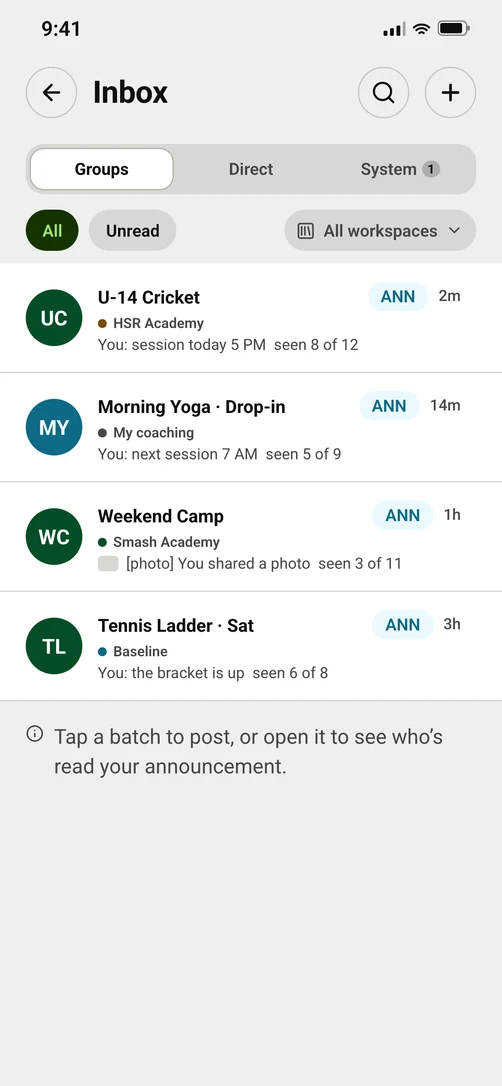
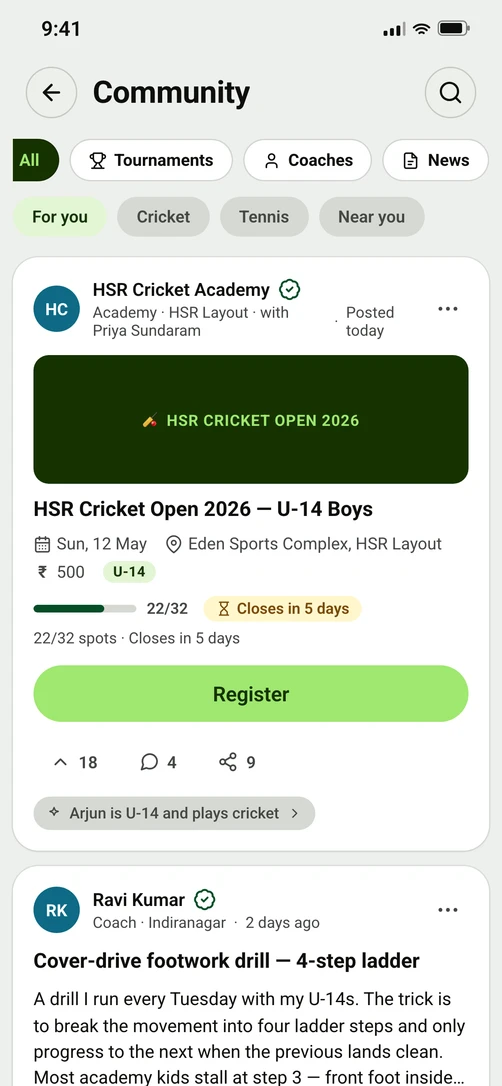
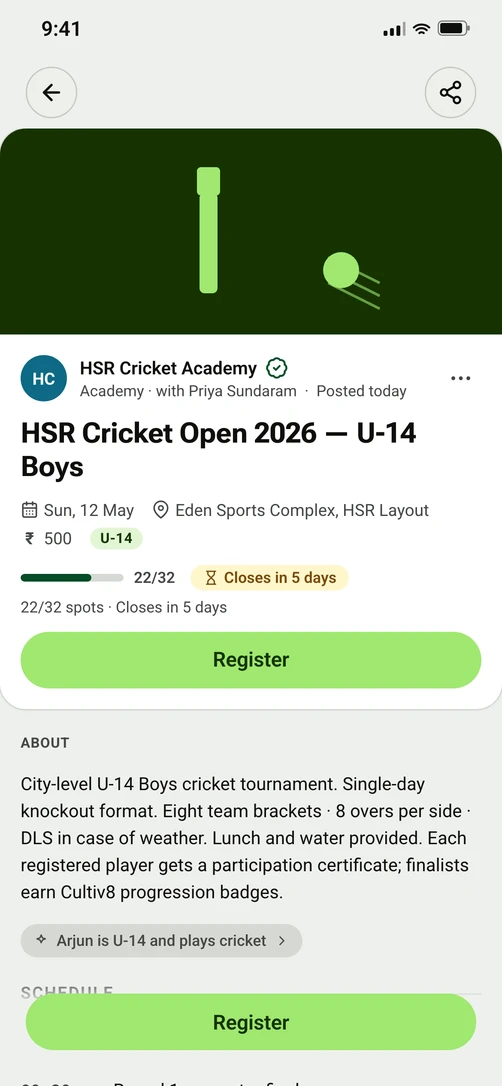
Every batch will get its own group chat that adds and removes students as the batch changes, so the conversation stays in Cultiv8 rather than leaving when a coach does. The community and the tournaments will sit around it — the reasons a family stays after the class ends.
Batch groups and messages
PlannedEvery batch will get its own group chat that adds and removes students as the batch changes, plus one-to-one messages. The conversation will stay in Cultiv8, so it does not leave when a coach does.
Community
PlannedCoaches share drills, parents ask questions and academies post updates, sorted by what is useful and browsable by sport and by area.
Tournaments and events
PlannedPublish a tournament, take entries, run the draw, and have every result land on the student's record on its own.
Coach welfare
PlannedGroup medical cover and career support at rates an independent coach cannot negotiate alone.
A dated record that opens doors for the student, and for you.
Ten years of coaching usually leaves nothing a parent can check, and a child who changes coach or city starts again from nothing. Every class you mark is already a dated fact in your own records. What is promised is what it becomes: a record the family owns and carries between coaches and cities, a level you can prove, and statements a bank accepts.
Proof of Play
PlannedA dated record of every skill cleared, class attended and milestone reached. It moves with the family between coaches and cities, and the family owns it.
ProofScore
PlannedA coaching level earned from months of classes you have actually taught, rather than claimed on a profile.
Video assessment
PlannedUpload short clips tagged by skill and by student, and put them side by side across a season.
Jobs
PlannedAcademies and schools post coaching jobs, and coaches apply with a profile that already carries what they have taught.
Proof of income
PlannedMonthly and yearly statements you can hand to a bank when you apply for a loan or a card.
Analytics & BI
The numbers that say what to do next.
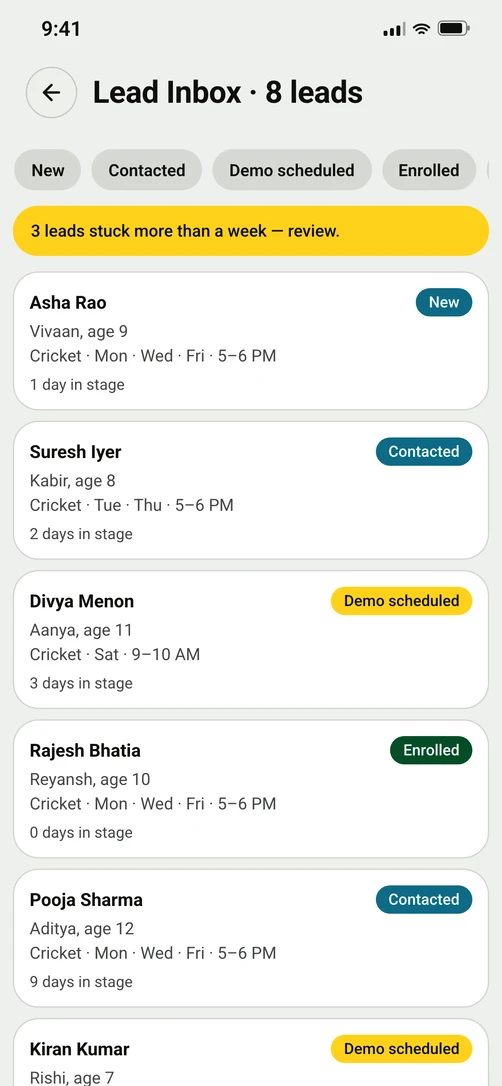
How full each batch is, which programs hold their students, and which sports and areas have families asking with nobody answering will be read off your own records rather than guessed. The same numbers will show where to open the next batch.
See where the demand is
PlannedUnanswered requests add up into a live picture of which sports and areas have nobody teaching them, so you can open a batch where parents are already asking.
Academy numbers
PlannedHow full each batch is, which programs hold on to their students, and which coaches keep theirs.
AI copilots
Ira automates the paperwork, and hands every result back for you to approve.
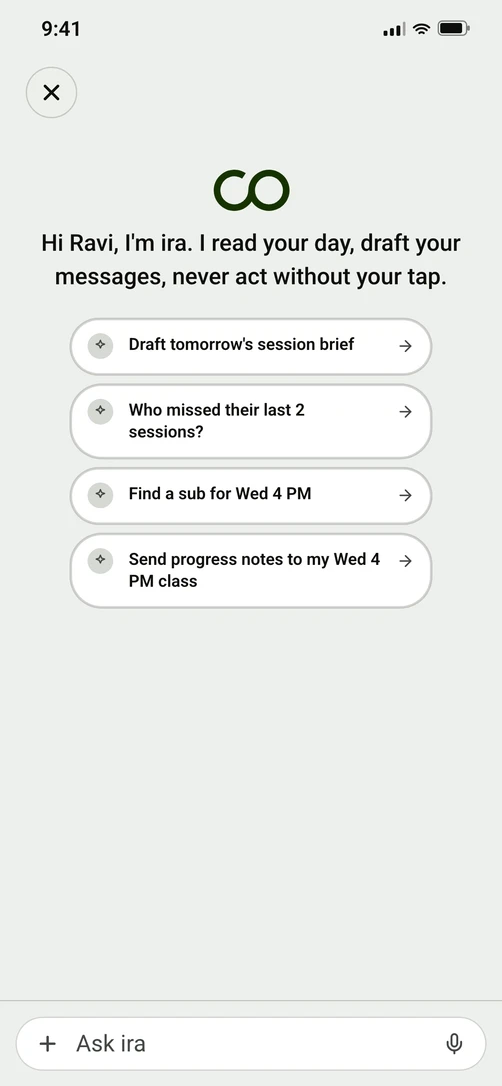
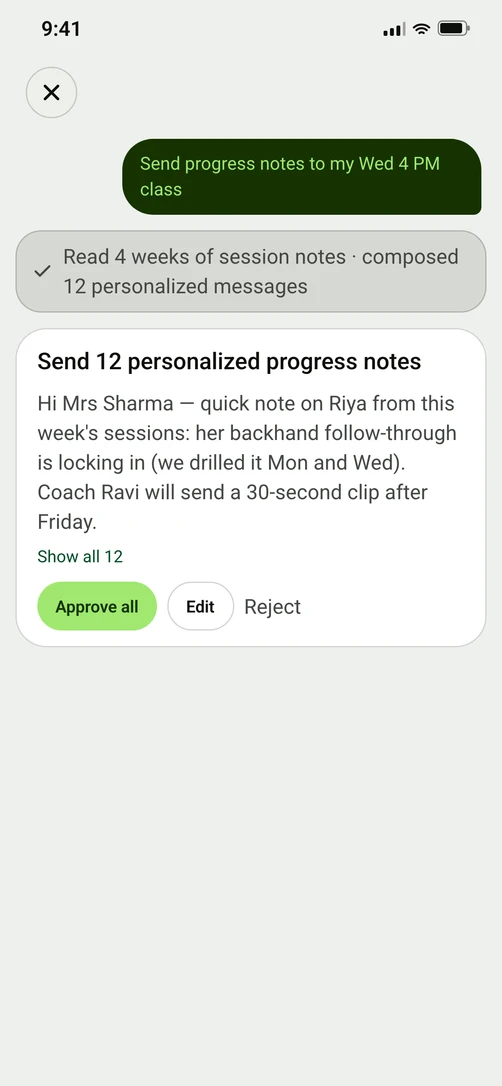
Ira is the assistant being built beside every stage. Writing the messages that follow, turning a voice note into notes for each student, and briefing you before a class are planned, in that order. Ira never acts without your approval, never marks attendance, and never modifies fee records.
Ask about your own records
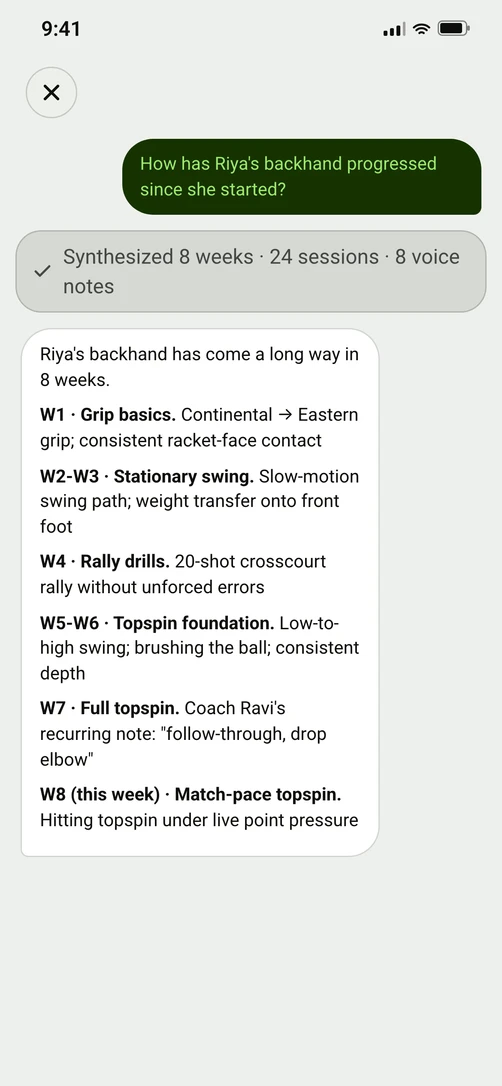
BuildingAsk which families have not paid this month, how a student has come along since she started, or when the next class runs, and read the answer off your own records.
Messages written for you to approve
PlannedIra writes the follow-up messages and holds them. You edit, you approve, and only then do they send.
Talk, and it becomes a record
PlannedA ninety-second voice note turns into notes for each student, skill updates and attendance flags, each one held for you to confirm.
A note before every class
PlannedHalf an hour before a class: what you planned, who is on a streak, who missed the last one, and where you left off.
Data platform
Every interaction becomes data, and data becomes memory.
Every schedule set, mark made and fee collected lands in one record, kept apart per customer and gathered with a parent's consent. Your money dashboard reads that record today, and the wider dashboards and Ira will read it as they arrive — and it belongs to the people it describes, never sold.
Foundation — trust, compliance & safety
Consent first, and records that stay yours.
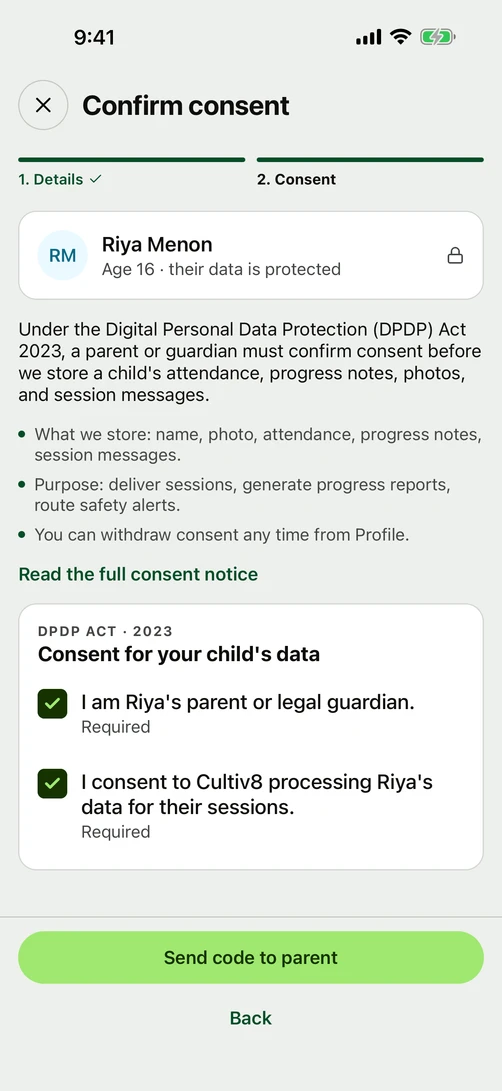
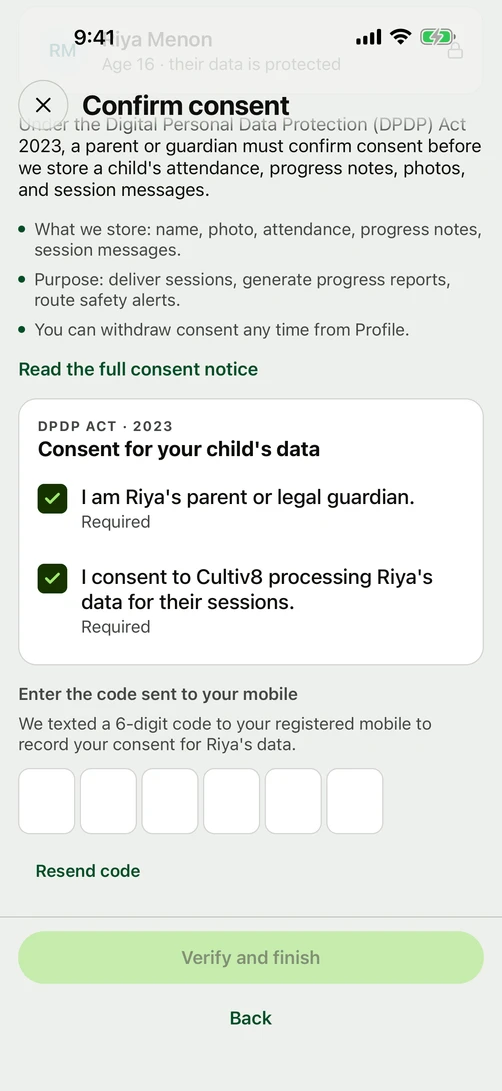
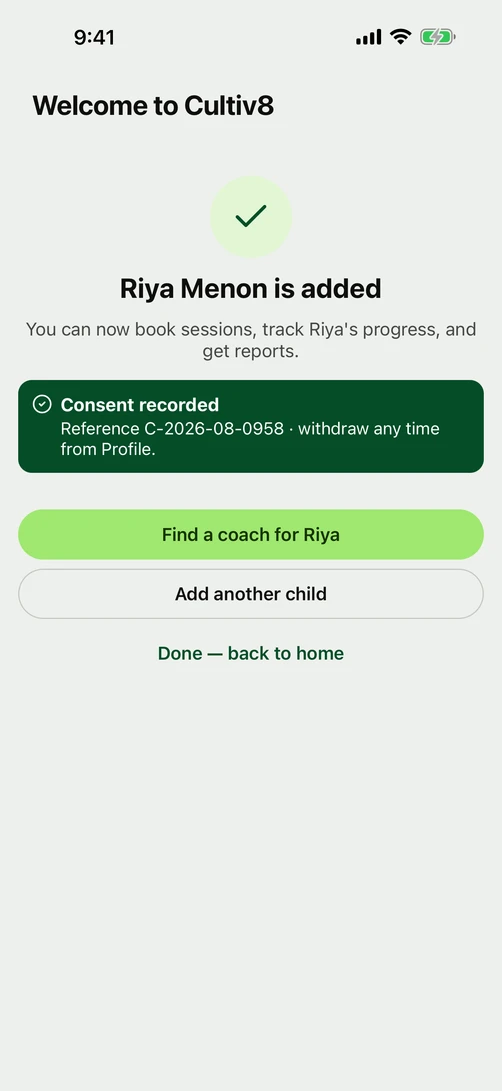
A parent's consent is recorded before a family account is linked to a child, nobody outside your own account can read your records, and every record is stored in India. Neither app carries an advertising tracker.
A parent agrees first
LiveA parent's consent is recorded before a family account is linked to a child, and a guardian confirms it with a one-time password. The agreement is checked against the parent, and it is never overwritten.
Your records stay yours
LiveCultiv8 keeps every customer's records apart from every other customer's, and checks who is asking twice before it returns any of them. A request that does not say who it belongs to gets nothing back rather than everything.
A person writes every mark and every payment
LiveNo AI writes an attendance mark or a fee record. A mark is only ever made by a person, and a bill only ever follows the plan you set. Ira will be able to write the message about one, and it never acts without your approval.
Your account, and closing it
LiveSet up how you sign in, and close your account and delete its records from inside the app.
Ask for your own data
See what Cultiv8 holds about you, correct it, or take it with you, without emailing anybody.
The verified badge
PlannedSend your identity documents and certificates in for checking, and carry a badge families can rely on.
Two apps
Cultiv8 Partner for coaches and academies, Cultiv8 for parents and students.
Both are in early access and neither is on an app store yet. Beta participants receive them directly from the Cultiv8 team, for Android and iOS.
Frequently asked questions
What is a program, and what is a batch?
A program is what you teach — under-12 cricket, beginner Bharatanatyam. A batch is one group inside it: which days, what time, where, how many seats, and which coach. One program holds as many batches as your week has room for. A batch with one seat is called a Slot on the screen that shows a single booked class — yours and the family's alike — though the pages a family browses before buying say batch throughout.
Where do the dated classes come from?
From the batch. You set the days, one start time, how often it repeats and when it ends, and the app shows what that will create before anything exists — every week on Mon, Wed and Fri at 6 pm, 78 classes in the next six months. Publishing makes about six months of dated classes at once and adds more as time passes. Each dated class is a session, every venue you teach at lands on the same calendar, and a session is what you mark the register against.
I have made a program. Why can no family see it?
Nothing reaches a family until you publish it, and nothing cascades: publishing a program puts its batches online and puts no plan on sale. A program with no batch refuses outright, and so does a batch with no days set or no coach named. The app lists what to fix rather than showing an error.
What is a plan, and how is it different from a program?
A program is what you teach. A plan is what a family buys: a price, and the batches that price covers. One plan can cover batches across several programs, and the family picks which one they are joining when they buy. Once a plan is published you can change its name and its price; what it covers and how it bills are fixed, so a different shape means a new plan.
Does every student have to be on a plan?
No. A student holds a place on a batch with a plan or without one — that place is your roster, and the app keeps them a seat in every class that batch runs. Mark them present and the class goes one of two ways: a plan covers it, and that plan raises its own bill when it next bills; or no plan covers it, and the family owes you for that class. Either way what you are owed is a fee.
How does a student get onto my roster?
Two ways. You type them in yourself, a name and a parent's mobile number to a line, or paste your list in whole, and then hand the family the invite link — Cultiv8 sends none of them for you. Or a family joins from your page and arrives as their own row. Where a child is concerned, nothing is stored until a parent enters a six-digit code on their own phone.
Do I collect ahead, or bill after the month?
Either, and you choose it plan by plan. Postpaid bills after the month has run, at a flat monthly price or a rate per session that follows the classes you held, and a family joining mid-month pays only for the classes left. Prepaid asks for a term of one, three or twelve months and collects it up front, and nothing starts until the money is in. Cultiv8 never charges a family on its own: a bill comes due, and they choose to pay it.
What is my public page, and where is its link?
Your profile is your page. You write the headline, the About and the photos, and the rest fills itself: every program you publish appears with its batches, its trial and the plans that cover it, and the places you teach are read off the batches that run there. Share hands you one link, which opens in the Cultiv8 app rather than a browser — so a family needs the app to read it, and Cultiv8 sends it to nobody on your behalf.
What is the difference between a coach page and an academy page?
A coach page is you: what you teach, where, and the batches you run. An academy page is the institution: its venues, its awards, its team of coaches, and the batches those coaches run. Registering an academy opens a second set of books beside your own classes, and a button at the top of every screen names which set you are working in. A coach shows on the academy page only once they have published a page of their own.
Early access
Join the beta.
Early access is open to coaches, academies, families. Leave an email address or a mobile number, and someone from Cultiv8 will get back to you.
You are on the list. Someone from Cultiv8 will be in touch.